Getting Started: Doom Legacy Launcher 2 is a modern launcher designed for the Doom Legacy source engine. Built with simplicity and ease of use in mind, its functions are completely self-explanatory. When running the launcher for the first time, you will be greeted by the Setup tab. This is where you configure your Doom Legacy executable location, IWAD folder path, and basic game parameters before launching.
If you haven't downloaded Doom Legacy or don't have any Doom IWADs installed yet, simply navigate to the Updates tab. From there, you can download the latest Doom Legacy engine alongside free shareware or Freedoom IWADs. This feature will have you up and running in just two clicks!
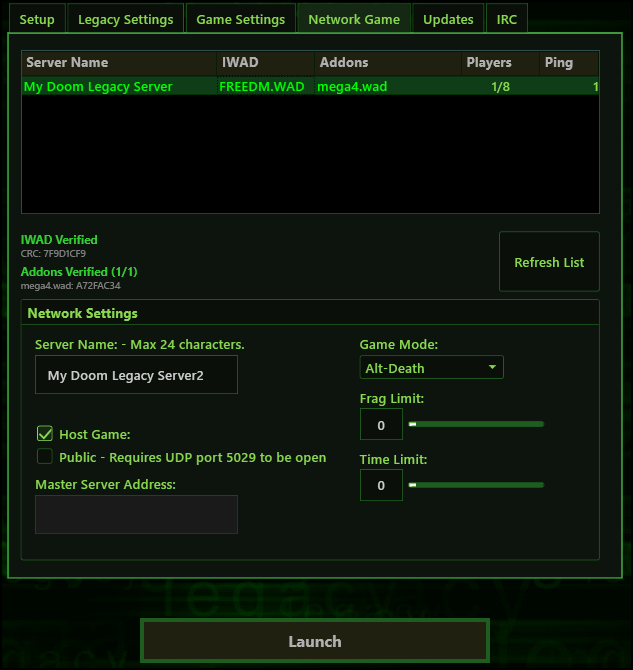
Advanced settings can be found within the Legacy Settings tab and the Game Settings tab, where you can modify execution values or load additional file add-ons. To host or connect to multiplayer sessions, head over to the Network Game tab. When hosting matches online, remember to forward UDP port 5029 so your server shows up globally on the public master server tracker. To join an active session, simply double-click any item in the server list.
The launcher also features an integrated IRC tab. This allows you to chat with other community members and coordinate match timings directly inside the client interface.
Finally, we have the Launch button.

The launch button will always be sitting ready to launch the game any time you click it.
The button will become disabled however if you've already clicked it to Launch a normal game,
or have clicked it to Host a game from within the Network Game tab.
Below is a somewhat detailed breakdown of each individual tab's layout capabilities.
Setup Tab:
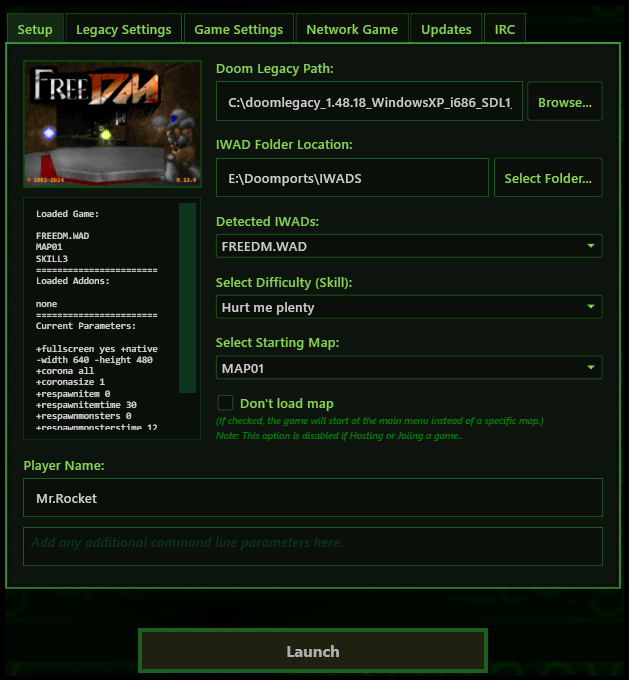
- Doom Legacy Path: Click the Browse button to Manually Load your Doomlegacy.exe location.
- IWAD Folder Location: Load the Folder location where you store all your IWADs.
- Detected IWADs Selector: Quick dropdown options listing all valid games found inside your IWAD folder path.
- If the Path requirments for the Doom Legacy engine or the IWAD location aren't met, and you click Launch, the launcher will inform you and or direct you to the Updates tab to download Doom Legacy or Shareware IWADs if needed.
- Once you have your location paths setup, and an IWAD is selected, both Skill and Maps Combo boxes will now be active displaying the Skill and proper list of given maps depending on the selected IWAD.
- The "Don't load map" check box is exactly that, if you check it, and click Launch, the game will load without spawning you in a map, and the first thing you'll see is the game's Title Screen but the setting still loads all other launcher settings. This setting has no affect for a Network game, since we will always load a map then.
- Player Name is obviously where you'd enter your Player Name to display in game. Note* this does not refect your IRC user name or Nick Name.
- As discribed in the Launcher, the field just below the Player Name is where you can enter any Additional Command Line Parameters with a - followed by a Command or a + followed by a Console variable, if wanted. ~ View the Doom Doom Legacy Docs for more infomation about these parameters.
Legacy Settings Tab:
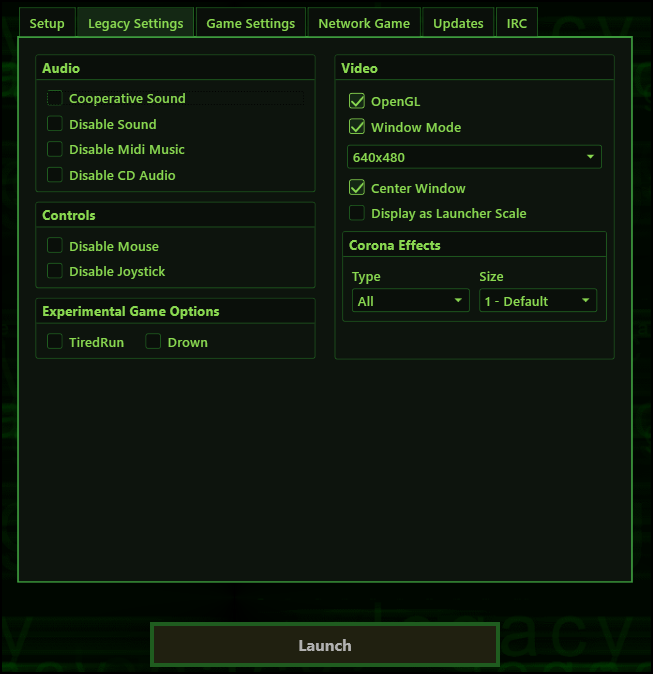
The Legacy Settings tab is mostly populated with a lot of check box and combo box controls to enable or disable random parameters.
Audio being first where you'd mostly want to keep disabled or unchecked, but they are here incase you'd rather listen to your own music or just don't want to hear anything at all, or maybe just for testing. The same pretty much goes for the Controls, Disable Mouse and Disable Joystick will usually go unchecked. The Experimental Game Options are mostly here for testing new features recently added to Doom Legacy. Try them out and see if you like them! More will likely be added to future versions of the Launcher. This now brings us to the Video settings. These will likely become the most usful settings in the this tab, where obviously we'll select OpenGL and Window Mode video resolutions. The Center Screen check box is a Launcher feature, since on Windows anyway, and in windowed mode, Doom Legacy will end up being displayed in the upper left corner of your screen without it. When checked, the Launcher will try to force Legacy's game window to the center of your screen. You can also set the window to scale to the size of the Launcher using the Display as Launcher Scale, if wanted. Now for the Conrona Effects controls. They allow you to changed the Type and Size of Legacy's classic spherical glow effects we see attached to the games light sources like candles, electric lamps and torches.
This tab is mostly left empty for two reasons. Some settings can only be changed in game, and room has been made for future additional controls.
^ Back to TopGame Settings Tab:
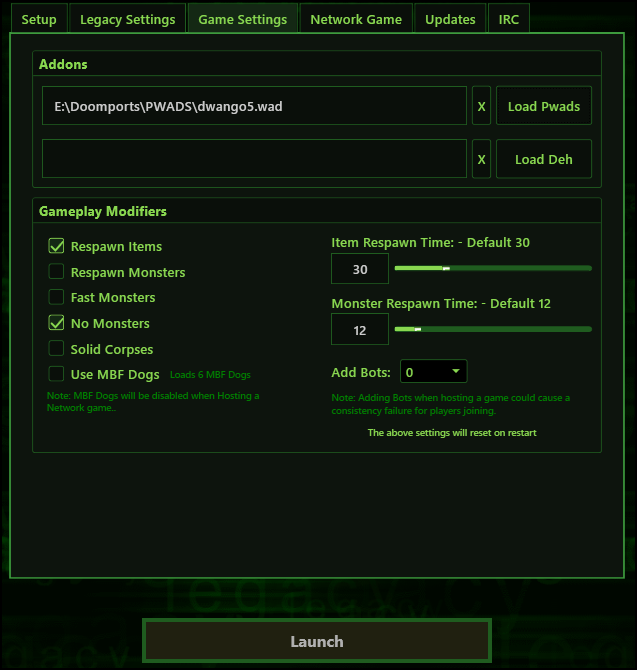
In the Game Settings tab we have:
Addons: Load your PWAD .wad or Dehacked .deh files here. Like most settings in the launcher, once added, the path will still be there the next time you load the launcher. The same goes for Gameplay Modifiers: These check boxes are self explainitory other than the MBF Dogs checkbox. MBF Dog helpers have been added to the launcher to make those tough levels easier, if needed. When MBF Dogs is checked, 6 dogs will be loaded. Note that this option does not apply to a Network Game. These checkbox controls will be remembered so you won't have to recheck them every time you load the launcher. However, the Item Respawn Time and Monster Respawn Time slider controls will reset on reload, as will the Add Bots selection. You can add up to 8 bots here. Note* if hosting a network game, it's not advised to have bots loaded, since it can cause consistency failures for joining clients.
As like the Legacy Settings tab, more controls and features will likely be added to this tab in the future.
Network Game Tab:
Host or Join Network Games:
In the Network Game tab, the first thing you'll notice is the Server List which will display any running Doom Legacy servers. Single-click a server will show the CRC Checksum of both IWAD and if there's a PWAD hosted, or if an Addon is missing prior to download. Double-click servers in the server list to Join a hosted game, or host your own local area network (LAN) and public internet games by checking the Host Game checkbox.
If hosting a game, add a new Server Name in the Server Name text field. If the server name entered is already in use, the launcher will inform you to change the name of it. Since you're planning to Host a server, you can also quickly adjust the Game Mode, Fraglimit and Timelimit prior to hosting..
As mentioned in the launcher itself, you will need to forward port 5029 UDP when hosting a public game so your server is visible to the public. You may want to go ahead and forward the port number for TCP as well. Most of the time, forwarding TCP isn't necessary because PWADs are downloaded directly through the launcher. However, if the server is hosting a custom PWAD or .Deh file and the file cannot be found, Doom Legacy will try to download it internally. This process requires a TCP connection for its P2P download stream instead of UDP.
When Host Game is checked and you're ready to start up a server, simply click the Launch button and your in game Doom Legacy server will be running, and your server will show up in the server list.
The Master Server Address field can be left blank; it is mostly there for future use. Right now, the launcher utilizes its own database to store hosted server information and relay it back to the client's server list data grid so players can view active matches worldwide, and join them.
Updates Tab:
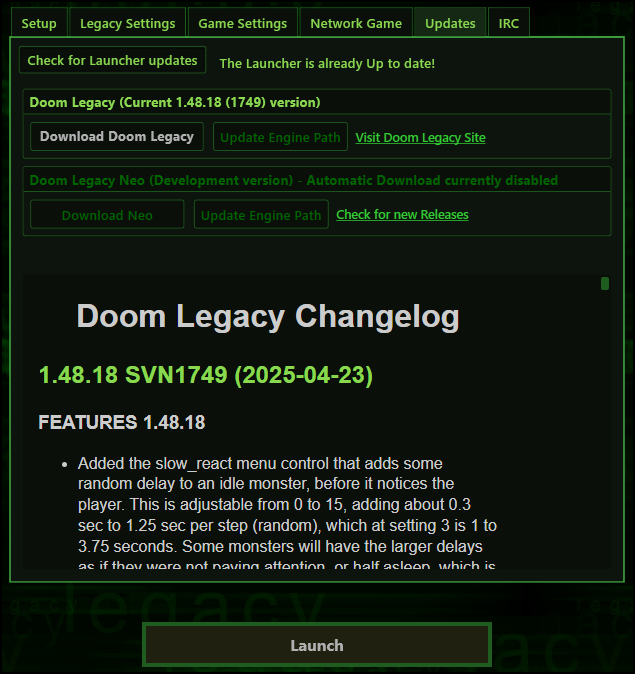
- The Updates tab is where you can Check for Launcher Updates or Download Doom Legacy as well as its Common resource files. The Launcher will download, extract them, and have you ready to play in a single click.
- The same goes for the Shareware and Freedoom IWADs. When the launcher detect that you don't have any IWADs installed, the Download Free IWADs button will be visible.
- Doom Legacy Neo is a development branch based on the 1.42 birthday version of Doom Legacy. Updated to SDL3, offering widescreen support and a new master server network protocol. Automatic downloads for Neo may be disabled at times; when this is the case, use Check for new Releases to be taken to the download page manually.
- Update Engine Path: This button is currently disabled and will be functional in later verrsions of the launcher. The reasoning behind it is if you have downloaded and installed both engines, the button allows you to switch between their engine paths. Letting you Immediately switch from the current Doom Legacy engine to Doom Legacy Neo engine with a single click.
- If you don't already own Doom or Doom II, the Don't have Doom? section has you covered. Clicking Download Free and Shareware IWADs will grab Freedom 1 & 2, FreeDM, the Doom Shareware (Episode 1), and the Heretic Demo — all free and legally redistributable — so you can start playing right away.
- Once a download finishes, the launcher will confirm what was installed and let you know your Doom Legacy Path has been updated automatically. It's still a good idea to double check the path afterward in the Setup tab.
- Below the download options, the Changelog panel displays the release notes for the currently installed version, so you can see what's new or changed at a glance.
IRC Tab:
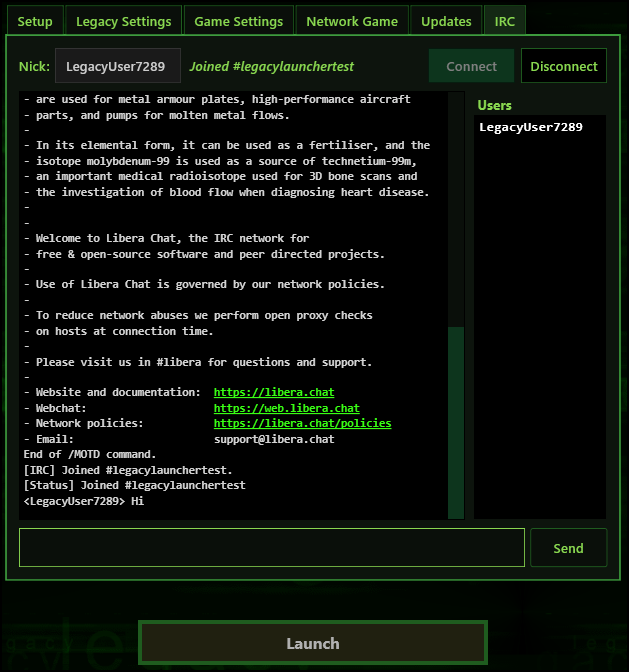
In the IRC tab, the launcher features an integrated, lightweight Internet Relay Chat (IRC) client that connects and joins #legacylauncher. This section is designed to keep players connected without requiring external client programs. The IRC client is pretty basic and it limited to most IRC commands. However, is Ideal for organizing DM or Coop sessions, challenging rivals or checking server availability with active players.
- Nick: The Nickname you will use when connecting to IRC. If no name is given, the default LegacyUser and [random number] will be generated. As mentioned in the Setup tab, this Nick name does not refect your in-game Player name.
- Connect: Joins channel legacylauncher immediately. Disconnect, or closing the launcher will disconnect you from the IRC server.
- Send: The Send message button obviously allows you to send a message. A message can also be sent simply by hitting your Enter key. After leaving a message the client has a built in history feature where you can arrow up or down to view your last message text history. The client also supports clickable links in the chat window.
- Note: All message transactions inside the chat window are subject to our behavioral terms to prevent flooding or server harassment.